

 Twitch
 Kick
KickViewer Bot
Overview
The Viewer Bot increases your live viewer count by sending simulated viewers to your stream. It's the most popular tool for growing your channel's visibility and attracting organic viewers.
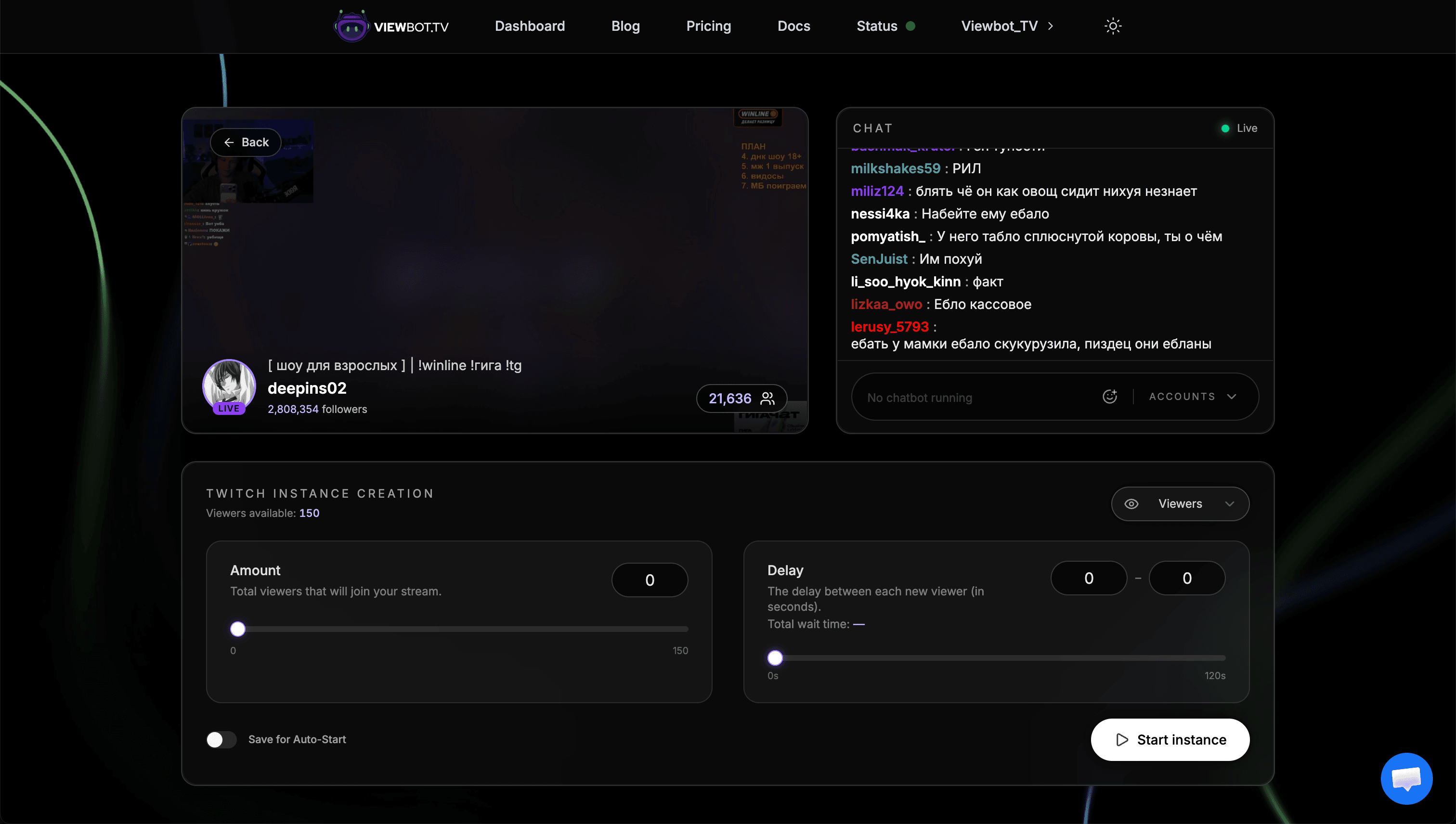
Parameters
| Parameter | Description |
|---|---|
| amount | Number of viewers to send to your stream |
| delay | "min-max" format: delay in seconds between each viewer joining |
| viewerlist | Twitch onlyWhen enabled, viewers will appear in the viewer list of your stream (on by default) |
| countries | Twitch onlyThe countries your viewers connect from, each with a weight. Found under Geolocation in the viewers panel, optional |
| audience profile | Twitch onlyWhere your viewers arrive from, what they watch on, and live views per unique viewer. Found under Audience profile in the viewers panel, optional |
How Delay Works
The delay parameter controls how quickly viewers join your stream. It uses a "min-max" format where a random value between min and max is chosen for each viewer.
"1-1"
Exactly 1 second between each viewer (1 viewer per second)
"0-5"
Random delay between 0-5 seconds (average 2.5 seconds per viewer)
"5-10"
Random delay between 5-10 seconds (slower, more natural growth)
Key insight: What matters is the average delay. A "0-5" delay averages to 2.5 seconds, so sending 100 viewers would take approximately 250 seconds (about 4 minutes).
ViewerlistTwitch only
The Viewerlist option makes your bot viewers appear directly in the viewer list of your Twitch stream. This makes the traffic look more legitimate and natural, as real viewers browsing your stream will see usernames in the viewer list, just like organic viewers.
Enabled by default
Viewerlist is turned on by default for all Twitch viewer bot instances. You can toggle it off if you only need the viewer count without appearing in the viewer list.
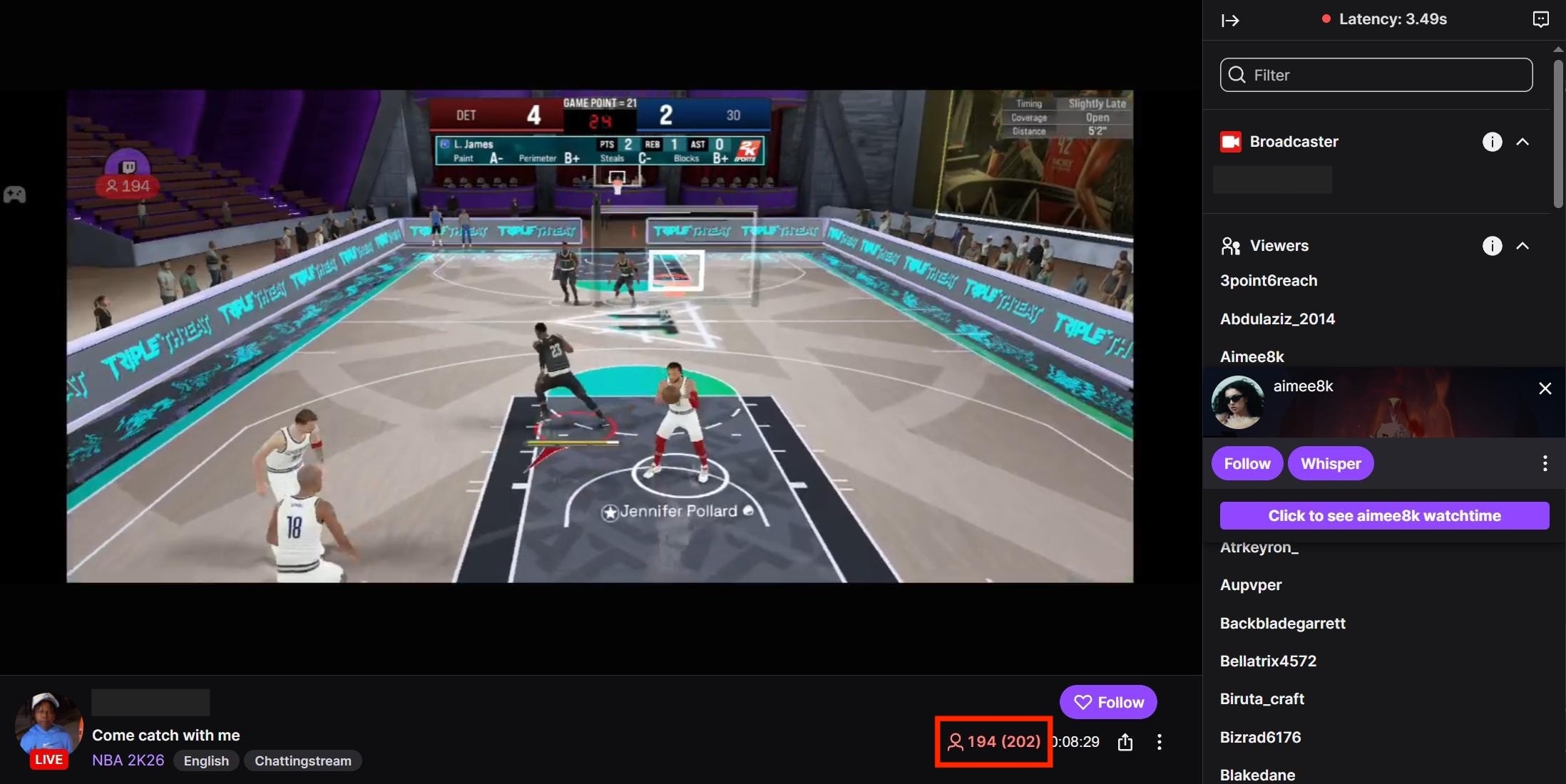
This feature is only available on Twitch. Kick does not expose a public viewer list, so the option is not shown for Kick channels.
Viewer Countries
By default your viewers connect from a worldwide mix spread across the major streaming markets. If your real audience sits somewhere specific, you can pick the countries yourself under Geolocation in the viewers panel. Country selection works on Twitch; on Kick, viewers always come from the worldwide mix.
Add one row per country and give each one a weight. Weights are relative, so they don't have to add up to 100: "70 / 20 / 10" and "7 / 2 / 1" give exactly the same split. The panel shows the resulting percentages as you edit, so you can see what you are actually sending.
Saved per channel
Your choice is remembered for that channel and reused every time you start viewers on it, including instances started automatically when you go live. Remove every country to go back to the default mix.
Match your real audience
If your analytics show where your audience watches from, like the Views by Location breakdown on Twitch, choosing countries that line up with it keeps your numbers coherent, the same way gradual growth does.
Audience ProfileTwitch only
Under Audience profile, a second panel next to Geolocation, you can shape how your viewers appear in your Twitch analytics: where they arrive from, what they watch on, and how many live views each of them counts as. Every order already has sensible values for all three, and those are what the form opens on. Each group is a set of sliders whose shares always add up to 100%: drag one up and the others give up the rest between them, so the group is always a whole audience. Push a slider to 0 to take that group out entirely.
Traffic Sources
How each viewer reaches your channel. Twitch splits the traffic it shows you into the same groups, so these are the ones you see in your own analytics:
- Followers: viewers coming from the Followed Channels list in the sidebar
- Browse Page: viewers coming from the category directory
- Other Recommendations: viewers coming from the recommended channels column
- Searches: viewers coming from Twitch search results
- Direct / Other: viewers counted with no source at all, the way a direct link or a visit from outside Twitch is counted
Viewer Platform
Which app or site each viewer appears to watch from: Web, iOS App or Android App. This is what drives the platform breakdown in your analytics, so it is worth keeping in line with where your real audience actually watches.
Live Views per Unique Viewer
Twitch counts a live view for every session and a unique viewer for every person, so over any real broadcast the two numbers never match: people leave, come back and reload, and each return is another live view from the same viewer. This setting is how many live views each of your viewers is worth on your channel. The default is a natural ratio; raising it makes every viewer count as more live views, lowering it brings the two numbers closer together.
The defaults are the safest
The values you see in the panel are the ones our audience already uses on every order, and they are what a genuine Twitch audience looks like. Change them only if you have a reason to: an audience that is entirely iOS, entirely from Search, or with a much higher views ratio stands out from normal traffic and is easier to tell apart.
Each group always adds up to 100%
A group is a whole audience, so it never drifts: move one slider and the others give up (or take back) the rest between them, in proportion to what they already held. The percentage on a row is exactly the share that order sends. Pull a slider down to 0 to take that source or platform out of the audience entirely.
Saved per channel, applied on start
Like the countries, your profile is remembered for that channel and reused on later runs, including instances started automatically when you go live. Changing it while viewers are running takes effect on the next start, so stop and start the instance if you want it applied right away.
Raids
You can raid any Twitch or Kick channel with your viewer bot viewers. When you trigger a raid, around 60 to 70% of your current viewers will move to the target stream. Raided viewers will stay on the new stream for 15 to 30 minutes before leaving.
Keep it realistic
Just like a real raid, not everyone follows the raid. That's why only 60 to 70% of viewers transfer over, keeping the behavior natural.
Follow raids
Your viewers follow your channel when it raids out. This is on by default and can be turned off per channel with the Follow raids switch in the instance creation menu. It is saved for the channel and applies from that channel's next start.
Platform Recommendations
KickRecommendations
- Never send more than 2x your real viewers
- Viewer count refreshes every 5 minutes, be patient
- Gradual increases work better than sudden spikes
General Recommendations (Both Platforms)
- New stream (just started): You can use zero or low delay since viewer spikes at stream start are natural
- Stream running for a while: NEVER use zero delay, it causes suspicious spikes in your viewer graph
- Maintain coherence: You can't jump from a 20 average viewer channel to 100 overnight without raising flags
- Increase gradually: Grow your viewer count day by day, not all at once
Common Mistakes
Not understanding average delay
A "0-10" delay doesn't mean viewers join instantly, it averages to 5 seconds per viewer.
Using zero delay on established streams
This creates an unnatural spike that's easy to detect. Always use some delay after the first few minutes.
Not maintaining viewer coherence over time
Jumping from 20 to 200 viewers overnight looks suspicious. Grow gradually.
Tips
Take your time. This is a growth tool, not magic. Patience and consistency will give you the best results.
For Kick: Be patient, the viewer count only refreshes every 5 minutes. Don't panic if you don't see changes immediately.
FAQ
Next Steps
Learn about the Chat Bot to add chat activity to your stream, or the Follower Bot to grow your follower count.