

 Twitch
 Kick
KickChat Bot
Overview
The Chat Bot adds chat activity to your stream using multiple bot accounts. You can use custom messages, control timing, and even send messages manually from specific accounts.
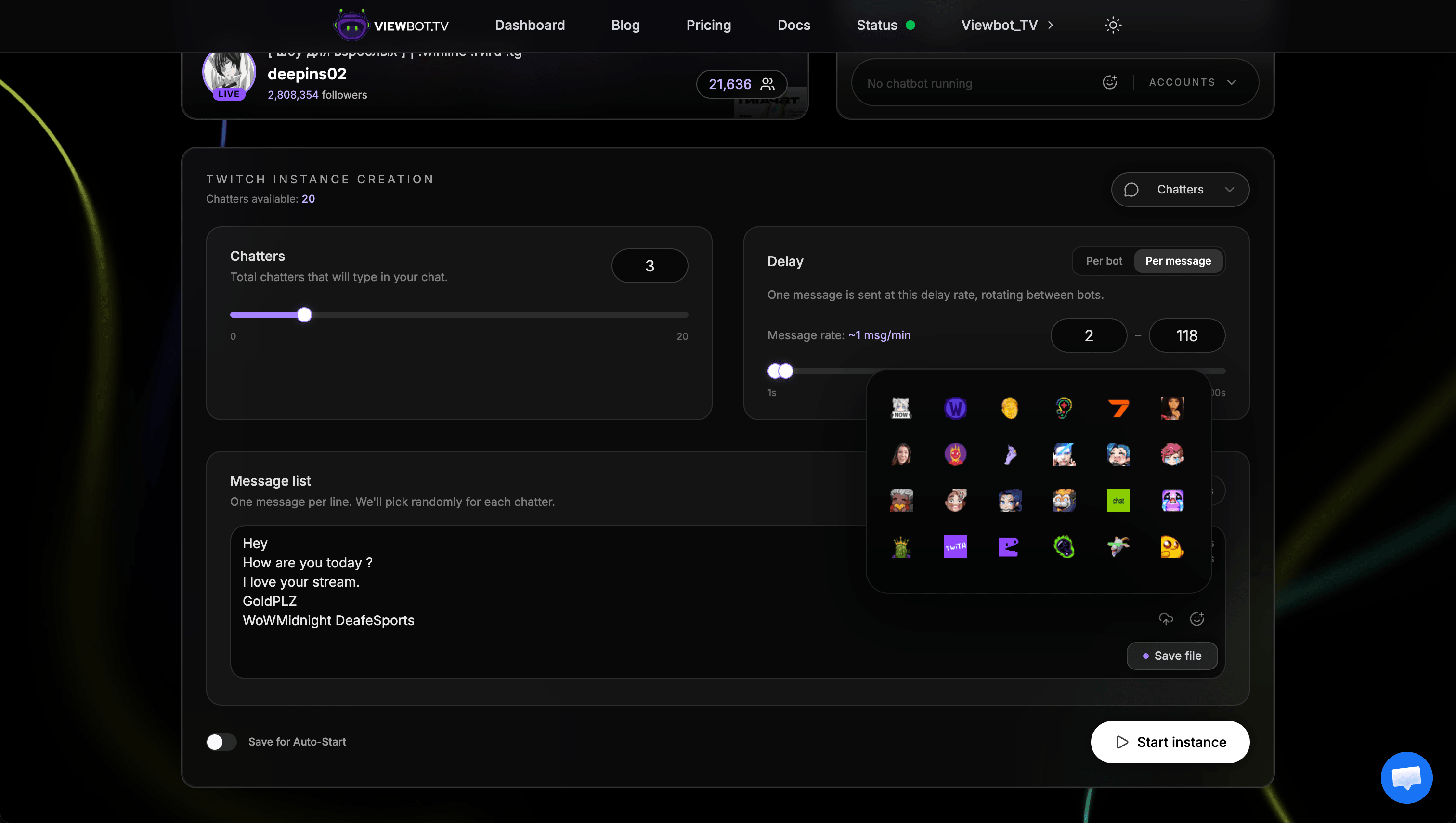
Parameters
| Parameter | Description |
|---|---|
| amount | Number of concurrent bot accounts chatting |
| delay | "min-max" format: timing between messages |
| mode | per_bot or per_message |
| chatlist | Custom message list |
How Amount Works
The amount parameter determines how many different accounts will be actively chatting.
- 50 chatters = 50 different accounts actively chatting
- Each restart uses new random accounts from our pool
- More accounts = more variety in usernames
The Accounts Behind the Chat
Every chatter is a real Twitch or Kick account from our own pool, built up over years, and not an empty placeholder created for your order.
- A realistic username and a profile picture, so a viewer who clicks the name sees a normal profile
- On Kick, a real Kick level, earned from watch time, shown next to the name in chat
- Follows and messages stay on the account, so the history looks lived-in
The same pool feeds the Follower Bot, which is why a follower arrives with a profile that looks like it has been around, and why chatters can talk in follower-only chat once you have built that pool up.
Mode Explained
per_botEach bot has its own independent delay timer. With 50 bots set to a 1-5 second delay, you could potentially receive up to 50 messages within that time window.
Best for
High-activity streams with lots of chat
per_messageThere's a global delay, and only 1 message is sent every 1-5 seconds, randomly choosing which account sends it.
Best for
Smaller streams with natural-looking chat pace
Follower-Only Chat Mode
If your channel has follower-only chat enabled, only accounts that follow your channel can talk. The Chat Bot checks this for you when it starts: there is nothing to switch on.
- 1Use the Follower Bot first to build up your follower pool
- 2Start the Chat Bot as usual: it sees that follower-only chat is on by itself
- 3The Chat Bot will only use accounts that have followed your channel
Tip: More followers = more account variety in chat. If you only have 20 followers, the chat will cycle through the same 20 usernames. Send more followers for greater variety.
Individual Chat Control
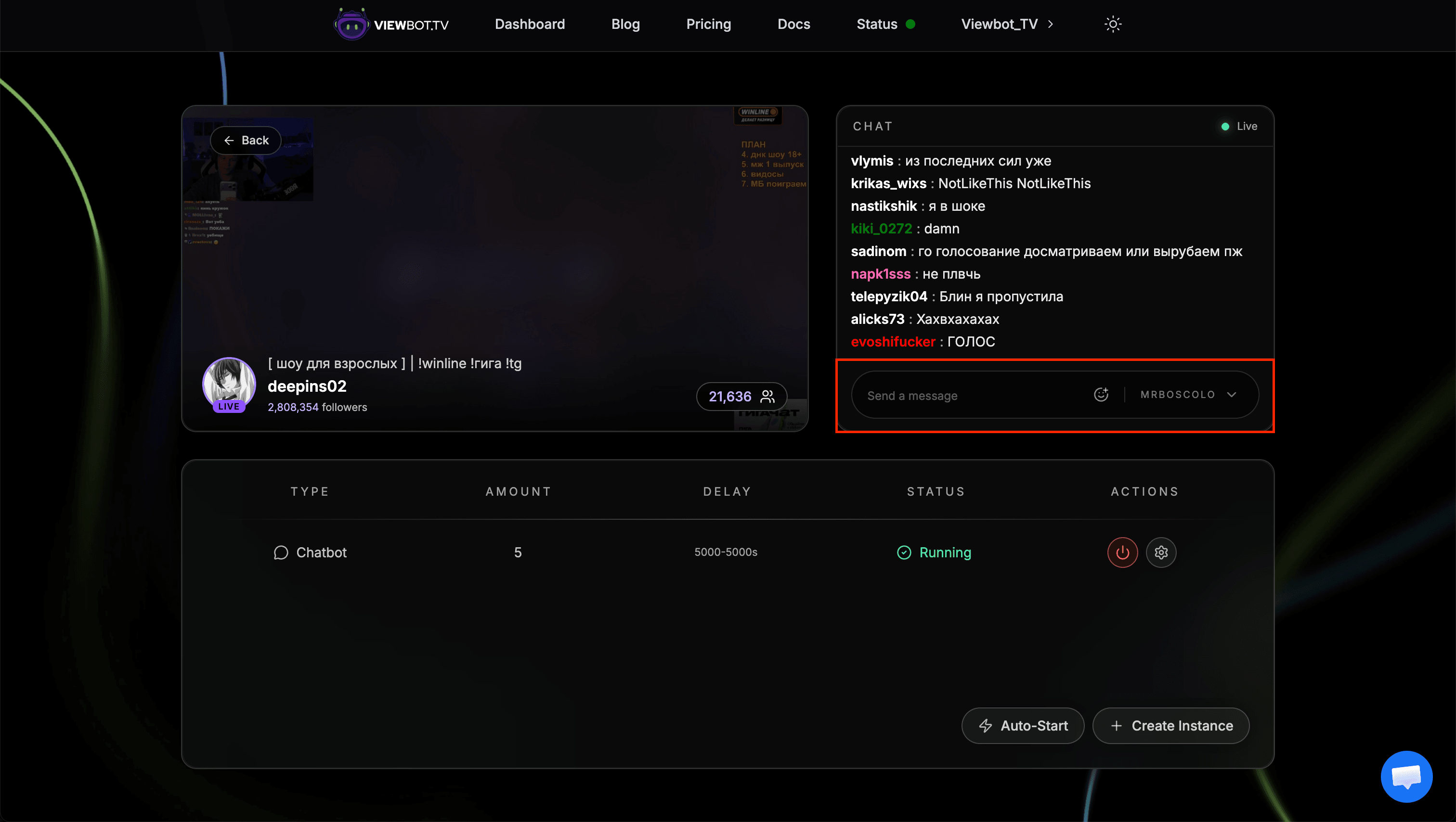
One of the most powerful features: when you start a Chat Bot instance, all accounts become available for manual control.
- 1Start a Chat Bot instance
- 2Go to the channel menu
- 3Find the chatbox section
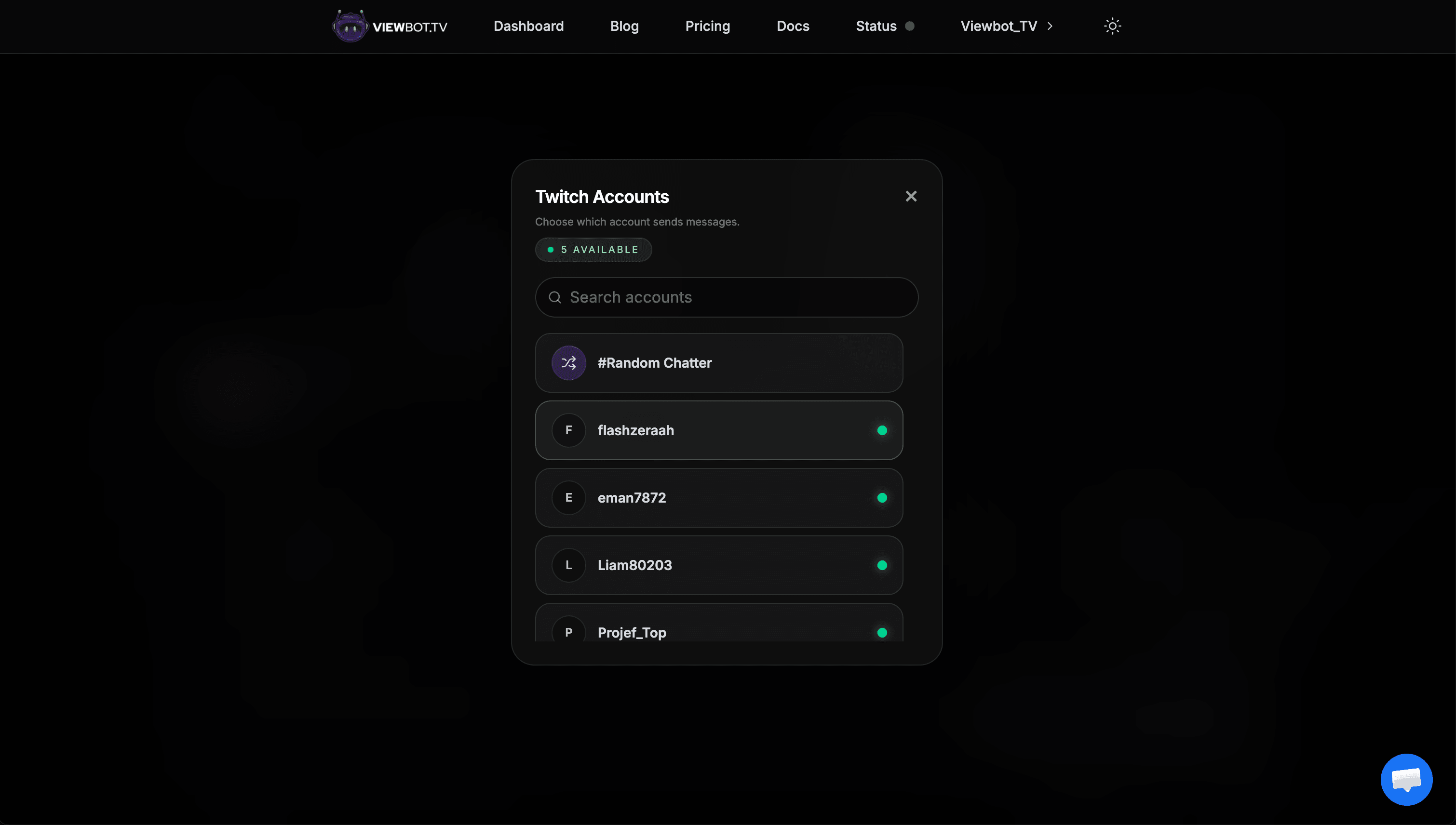
- 4Select which username/account you want to use, or choose #Random Chatter to send from a random account each time
- 5Type your message and send
This is great for responding to real viewers using bot accounts, creating conversations, or sending specific messages at key moments. With #Random Chatter, every message you send will come from a different randomly selected account, making conversations look even more natural.
Custom Messages
You can provide a custom list of messages for the bots to use. The bot will randomly pick from your list.
Format:
- One message per line (press Enter after each message)
- Any language is supported
- Bot randomly picks from your list
Great stream!
This is so cool
Love the content
Haha nice one
POG
Placeholders
The words below, written in curly brackets, are swapped for a real value at the moment each message is sent. That means one line in your list can go out looking different every time, which keeps your chat from repeating itself. Anything else you put in curly brackets is sent exactly as you typed it. Placeholders work on both Twitch and Kick, in your message list and in the manual chat box.
Your channel
| Placeholder | Replaced with |
|---|---|
| {name} | Your channel name |
| {title} | Current stream title |
| {game} | Current category or game |
| {viewers} | Current viewer count |
| {followers} | Channel follower count |
| {language} | Stream language, shortened at random on Kick, so English can arrive as EN or eng |
| {duration} | How long the stream has been live, as a phrase such as "just started" or "about 2 hours" |
These refresh while the bot runs, so {viewers} and {title} stay current. On Twitch you can also write {channel}, which is the same as {name}. If a value is not available, for example when no category is set, the placeholder is left in the message untouched, so avoid the ones your channel does not have.
Date
| Placeholder | Replaced with |
|---|---|
| {today} | The current day name, for example Tuesday |
| {thismonth} | The current month, for example June |
These follow the server clock, which runs on UTC. On Kick they are also shortened at random, so Tuesday can arrive as Tue or tue.
Random words
| Placeholder | Replaced with |
|---|---|
| {day} | A day of the week |
| {month} | A month |
| {adjective} | amazing, epic, hilarious, legendary and more |
| {verb} | On Kick an action such as run or jump, on Twitch how a viewer feels about the stream, such as love or support |
| {animal} | dog, cat, penguin, wolf and more |
| {color} | red, blue, green, purple and more |
| {emotion} | happy, excited, relaxed and more |
| {exclamation} | A short reaction such as wow, pog or sheesh |
| {food} | pizza, burger, sushi, tacos and more |
A random word is drawn again for every message and for every occurrence, so writing the same one twice in a line will usually give you two different words. The bot varies the wording automatically as well: capitalization, short forms such as Mon or Jan on Kick, plurals such as Mondays on Twitch, and extra punctuation on {exclamation}. The exact word lists differ a little between Twitch and Kick, so the same placeholder has a slightly different flavor on each platform.
Example:
{exclamation} this {game} run is {adjective}
{viewers} people watching and it is only {today}
been here for {duration}, love the {title} vibe
The first line can come out as "sheesh this Just Chatting run is epic" one time and "pog!! this Just Chatting run is legendary" the next.
Common Mistakes
Putting all messages on one line
Each message must be on its own line. "Hello, Hi, Hey" on one line is ONE message, not three.
Not sending followers first for follower-only chat
If your channel has follower-only chat, you must use the Follower Bot first to create your account pool.
Next Steps
Set up the Follower Bot to grow your follower count and enable follower-only chat mode, or check out the Viewer Bot to increase your viewer count.